
OrderFusion for WooCommerce
A plugin for the Orders page
Add the columns you need, combine instant filters, save one-click views, and export exactly what you see -
right in the WooCommerce Orders screen.
✓ WooCommerce Marketplace
✓ HPOS compatible
✓ Tested on 50k+ orders
✓ No external data sharing
What you'll see in the Orders screen
- Phone numbers without opening orders
- Tracking numbers and carrier info
- Products and SKUs in each order
- Private and customer notes inline
- Totals, coupons, payment methods
- Shipping country and state
Filter and export instantly
- Combine filters: product + date + status
- Save views for your team
- Export filtered results to CSV
Built for the way your team already works
Support
See phone and notes at a glance. Call faster, reply faster.
→ Learn how
Fulfillment
Find orders by product/SKU, shipping method, or tracking status.
→ Learn how
Accounting
Surface totals, payment methods, coupons, refunds - then export your current view to CSV.
→ Learn how
What you can do
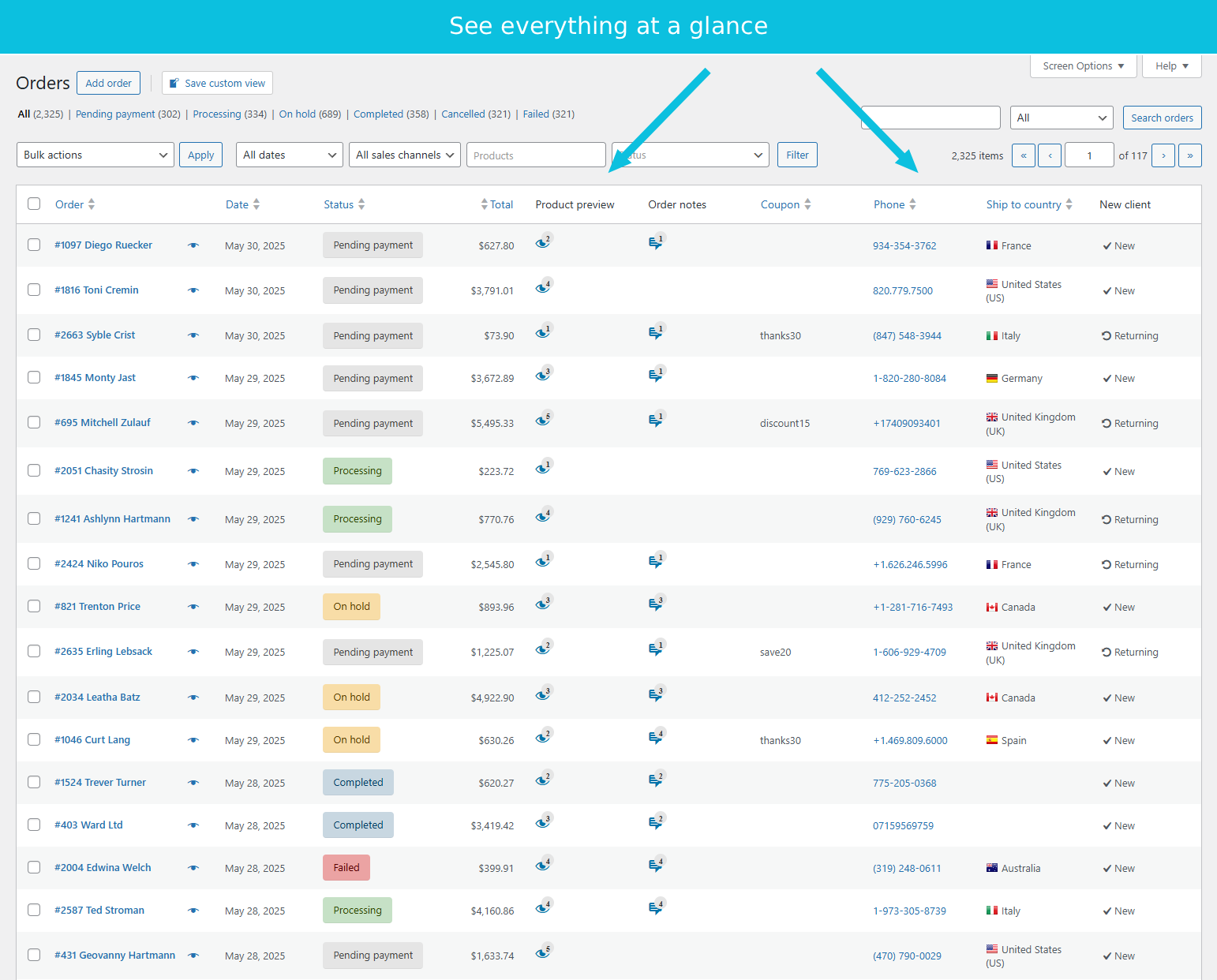
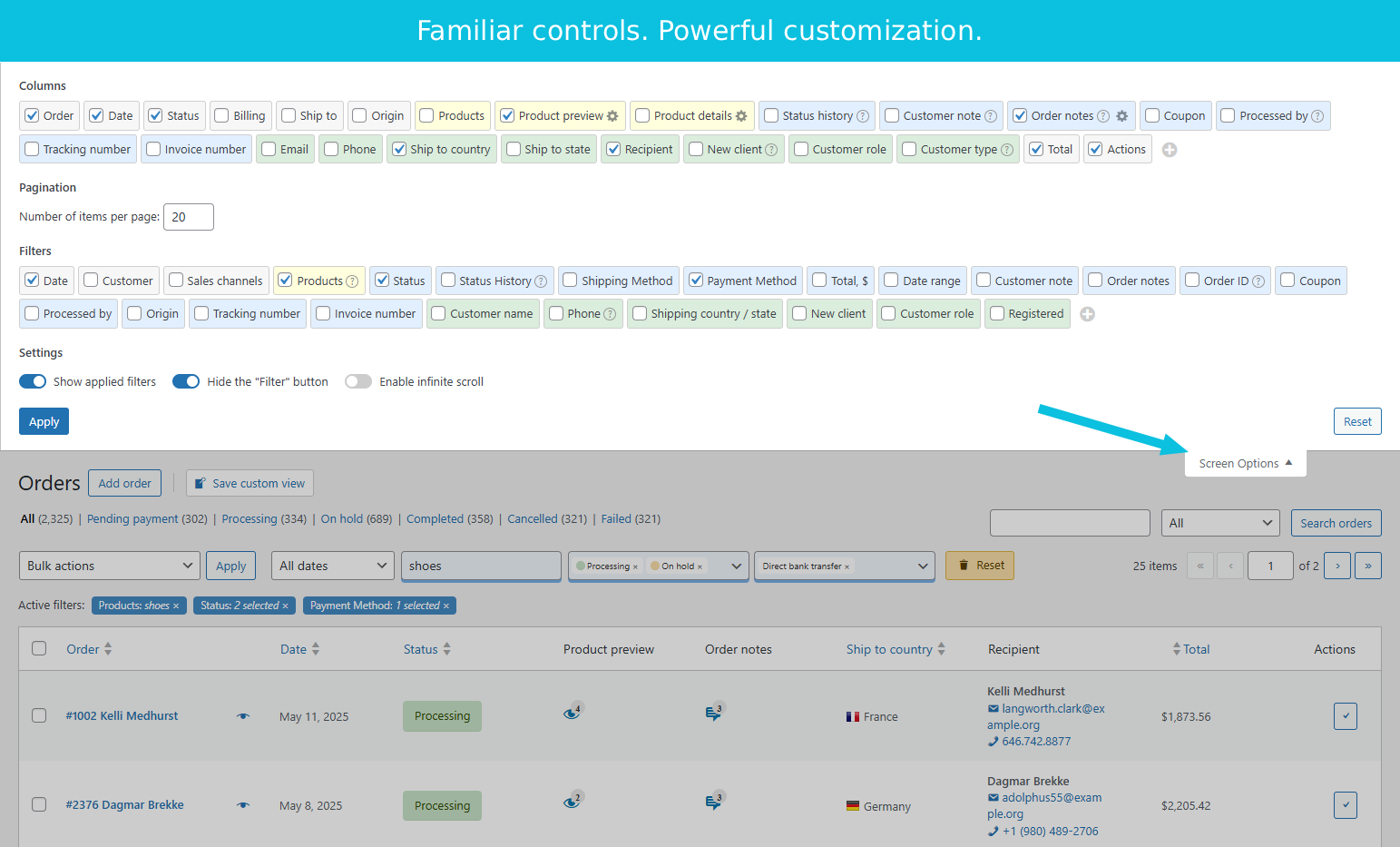
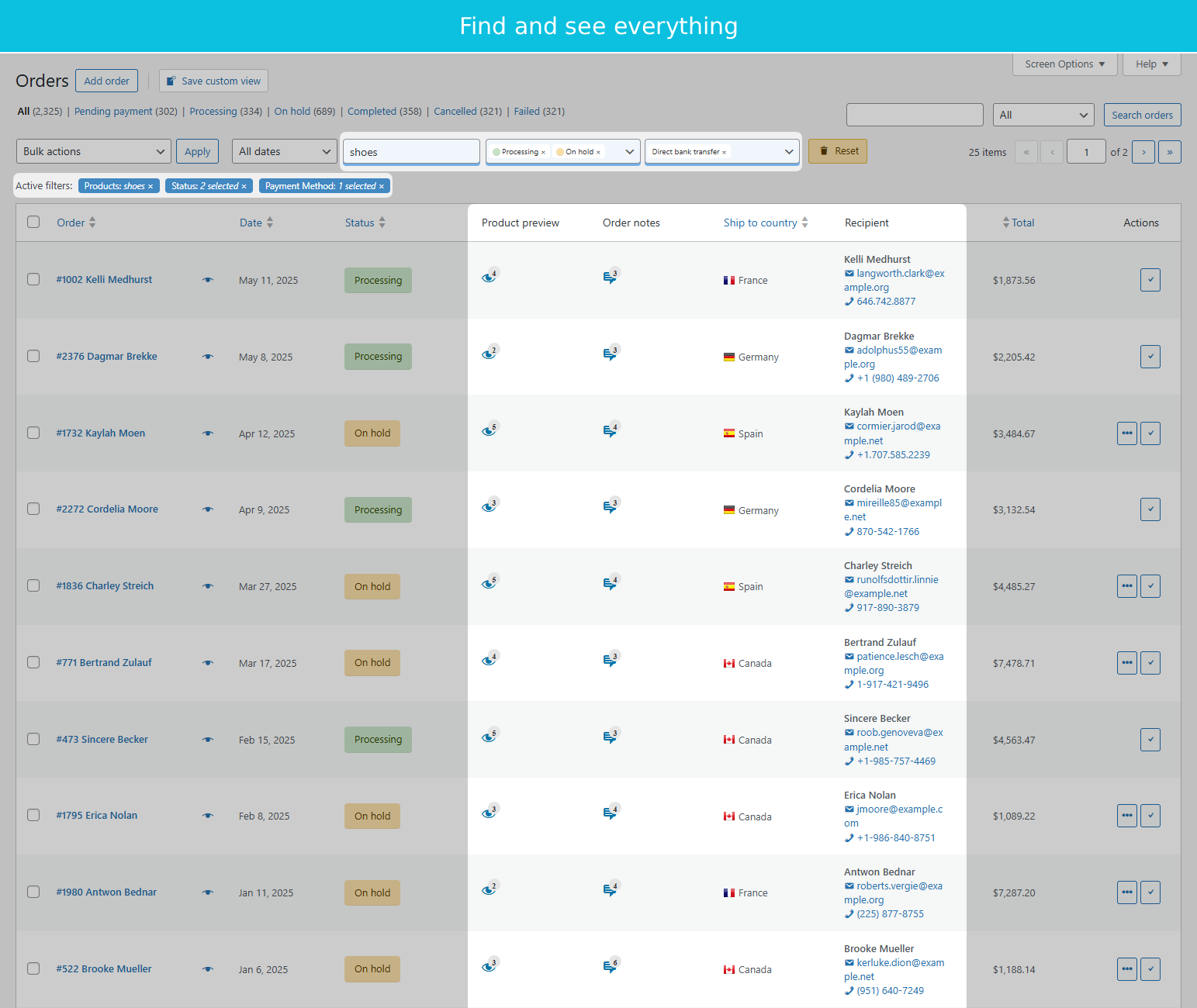
- See critical info without clicking into orders (phone, tracking, products, notes).
- Find exactly what you need (product/SKU, status, date range, totals, country/state, and more).
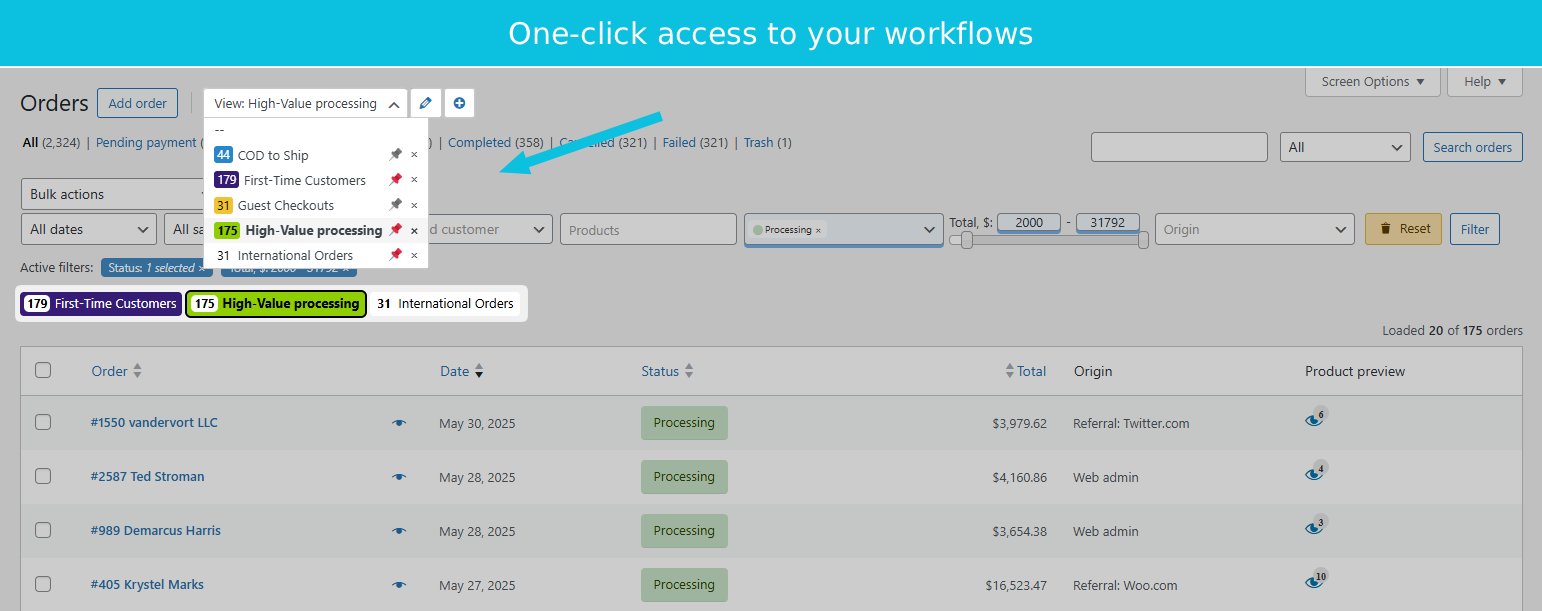
- Work faster with saved views for Support, Fulfillment, and Accounting.
- Export your current view-columns and filters included - straight to CSV.
- Stay in the native Orders screen (no new interface).
- Scale with confidence (AJAX filters, batch export, HPOS support).
Popular solutions
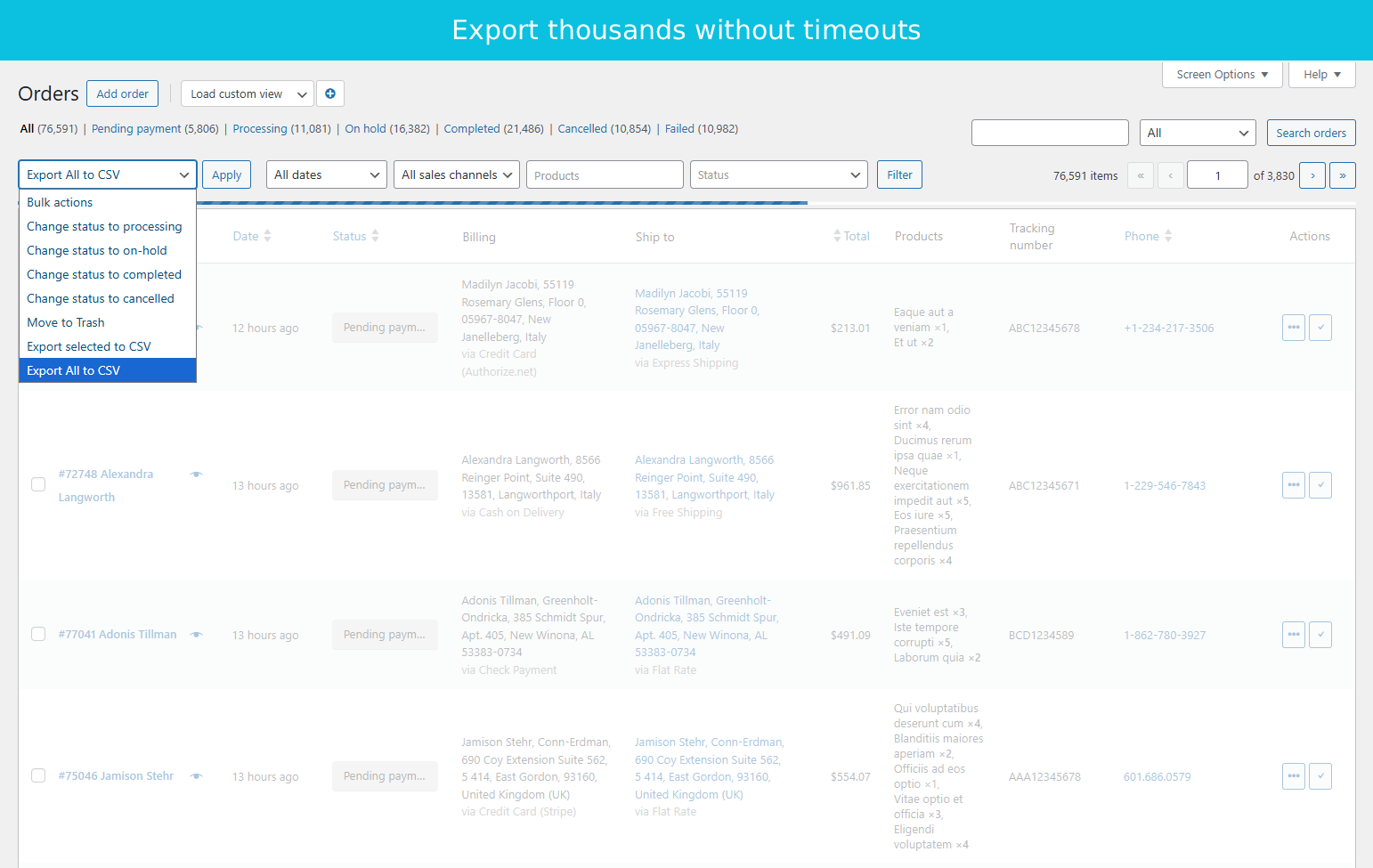
Show customer phone numbers in the Orders list
Stop opening 50 orders to copy phone numbers. Turn on the Phone column and keep working in list view.
Filter orders by product or SKU
Find every order containing ACME-XL-12 in seconds. Add a date range and status to narrow the list.
Export orders with tracking to CSV
Hand your warehouse a ready-to-use spreadsheet - no missing fields.
View order notes without opening each order
Scan private and customer notes inline; search notes for phrases like "fragile" or "call before shipping."
Create saved views for different teams
Switch Support, Fulfillment, and Accounting views with one click; keep everyone on task.
Filter by shipping country or state
Segment by destination (e.g., DE, FR or CA: California) and combine with date/status for dispatch.
Saved-View recipes
Ready to recreate in your store
Missing Tracking (today)
Filters:
Status = Processing
Tracking Number = "-"
Date Preset = Today
Columns:
Products, Phone, Tracking, Notes
High-Value Orders
Filters:
Total ≥ 500
Date Preset = Last 30 days
Columns:
Products, Customer, Email, Phone, Total
Recent Refunds
Filters:
Status = Refunded
Date Preset = Last 14 days
Columns:
Products, Notes, Coupon, Payment Method
International (EU) Dispatch
Filters:
Ship to Country = [DE, FR, ES, IT, NL, BE...]
Status = Processing
Columns:
Products, Ship-to Country, Phone, Tracking
Wholesale Role Orders
Filters:
Customer Role = Wholesale
Date = This Month
Columns:
Products, Customer, Email, Total, Payment Method
COD to CSV
Filters:
Payment Method = Cash on Delivery
Date = Last 7 days
Columns:
Products, Customer, Phone, Address, Total
Prefer a full list? Browse the Columns Index and Filters Index.
Ready to set up these views in your store?
Why OrderFusion fits your workflow
- Native feel: uses Screen Options and the Orders filter bar - no new panel to learn.
- Instant filtering: AJAX updates, zero page reloads.
- CSV that matches your screen: export the exact columns and filtered rows you're seeing.
- Team-friendly: save and switch Views for different roles.
- Built for scale: handles large stores; batch export avoids timeouts.
- Privacy-first: all processing on your server - no external calls or tracking.
Compatibility & performance
- Works with HPOS (High-Performance Order Storage) and legacy order tables.
- WordPress Multisite ready.
- Tested on stores with 50k+ orders.
- Optimized queries; no admin slowdown.
- Data never leaves your server.
What happens after purchase?
- Buy on WooCommerce.com
- Download & install the plugin ZIP in Plugins → Add New → Upload Plugin
- Activate and open WooCommerce → Orders to start customizing columns and filters
Need help first? Read the Documentation or open a Support ticket on WooCommerce.com.
FAQ
Can I show phone numbers in the Orders list?
Yes - enable the Phone column in Screen Options. Save it in a Support view (optional).
Can I filter by product/SKU?
Yes - use the Products filter (name, SKU, UPC, EAN, ISBN). Combine with Date/Status (optional).
Can I export orders with tracking to CSV?
Yes - show Tracking column, apply filters, then Export.
Will this work with HPOS?
Yes - OrderFusion detects HPOS automatically and uses it for performance.
Does it support multisite?
Yes - each site keeps its own settings and views.
Will it slow down my admin?
No - filters are AJAX; export is batched to avoid timeouts on large stores.
Can I add custom fields as columns/filters?
Yes - add custom meta via the "+" controls in Screen Options.