

WooCommerce order management in 2025: a faster admin workflow (without new tabs)
You’re managing orders in WooCommerce. You need to find the ones missing tracking numbers. So you click into an order. Check. Click back. Click the next order. Check. Click back.
Repeat 50 times.
That’s 12 minutes of pure clicking. Every day. For something that should take five seconds.
WooCommerce launched in 2011, when stores had dozens of orders per week. While the interface has evolved, the fundamental click-to-view workflow hasn’t changed much. The admin hasn’t kept up with stores processing hundreds of orders per day.
This post covers what modern WooCommerce order management looks like – and how to stop fighting the admin screen.
The tab problem
Most store owners solve this with browser tabs. One tab filtered by “processing.” Another for “on hold.” A third for orders from a specific product.
The problem: WooCommerce doesn’t save filters. Close that tab? Start over. Need to share your workflow with a team member? Good luck explaining “click here, then here, then type this.”
Tabs are a workaround, not a solution.
What a modern workflow needs
A fast order management setup has three things:
1. Filters that actually find things. Not just status and date. Filter by product, SKU, customer type, shipping method, payment gateway. Combine them: “processing orders over $200 containing product X.”
2. Columns that show what you need. The default list hides almost everything useful. You can’t see phone numbers, tracking status, or products without clicking in. That’s backwards. The list should answer your questions at a glance.
3. Saved views. Filter once. Save it. Click a button tomorrow to see the exact same list. Share it with your team so everyone works from the same queue.
Put these together and you stop navigating. You start working.
HPOS: why this matters now
WooCommerce is migrating order storage to dedicated tables. This is called High-Performance Order Storage, or HPOS.
Two things to know:
- Stores with 50,000+ orders will see faster load times
- Any order management tool that doesn’t support HPOS will break
If you’re evaluating solutions, HPOS compatibility is non-negotiable.
What this looks like in practice
Here’s a typical morning routine:
8:00 AM – Open “New Orders” view. 34 orders overnight. High-value ones (over $500) are flagged. Handle those first.
8:15 AM – Switch to “Missing Info” view. 3 orders need customer contact. Phone numbers visible in the list. Make calls without opening orders.
8:30 AM – “Ready to Ship” view. 28 orders. Product column shows what to pick. Fulfillment team works through the list.
12:00 PM – “Shipped Today” view. Verify tracking numbers. Anyone missing? Filter, fix, done.
Total admin time: 20 minutes of clicking. The rest is real work.
Compare that to opening 34 orders one by one. That’s 8+ minutes just to look at them.
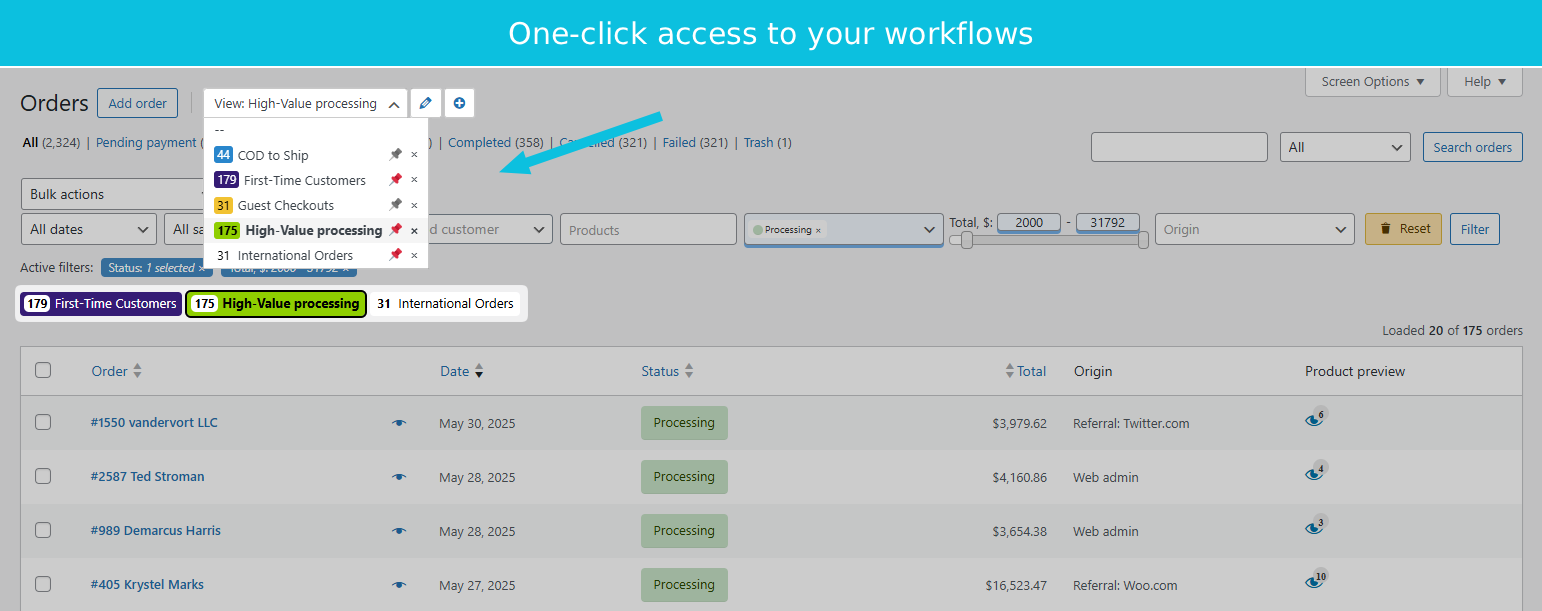
Want to try this yourself? Install OrderFusion Lite (free) and start filtering orders in minutes. Need saved views, custom meta columns, or Products & Coupons page support? See OrderFusion Pro.
Columns that pay for themselves
Some columns save more time than others:
| Column | Why it matters |
|---|---|
| Products (preview) | See what’s in the order without opening it |
| Tracking number | Verify shipping status from the list |
| Customer phone | Call without opening the order |
| Order notes | See support context at a glance |
| Processed by | Know who handled what |
Each column you add removes one reason to open individual orders.
The math on saved time
Say your team processes 150 orders per day. Without proper tools, navigating takes about 15 seconds per order: opening, checking, closing, moving on.
That’s 37 minutes daily. 13 hours monthly. Just clicking around.
With filters and saved views, the 15 seconds drops to under 2. You get 11 hours back every month.
That’s not efficiency theater. That’s a real half-day per week you can spend on things that grow the store.
Try the workflow
OrderFusion builds exactly this into WooCommerce. Filters for products, SKUs, tracking status, customer type, and custom fields. Columns you configure. Views you save and share.
See the workflow in action (demo)
The default WooCommerce orders screen works fine at first. But as your order count grows, you’re fighting the interface instead of using it. You don’t need a separate system. You need the orders screen to actually work.